Handles ghost data at block boundaries to ensure interpolation is (almost) always used instead of extrapolation. More...
#include <ReconstructionCommunication.hpp>
Public Types | |
| using | inbox_tags |
Static Public Member Functions | |
| template<typename DbTags, typename... InboxTags, typename ArrayIndex, typename ActionList, typename ParallelComponent, typename Metavariables> | |
| static Parallel::iterable_action_return_t | apply (db::DataBox< DbTags > &box, tuples::TaggedTuple< InboxTags... > &inboxes, Parallel::GlobalCache< Metavariables > &cache, const ArrayIndex &, const ActionList, const ParallelComponent *const) |
Detailed Description
struct evolution::dg::subcell::Actions::ReceiveAndSendDataForReconstruction< Dim, GhostDataMutator, UseNodegroupDgElements >
Handles ghost data at block boundaries to ensure interpolation is (almost) always used instead of extrapolation.
Since the coordinate maps are only continuous and not smooth at block boundaries, the logical coordinate axes, and therefore grid point axes, do not necessarily align. An example is given in the image below, which is a snapshot of 2d circular domain built from one central square surrounded by four deformed wedges. We zoom in on the upper right corner of the cube for illustration purposes.
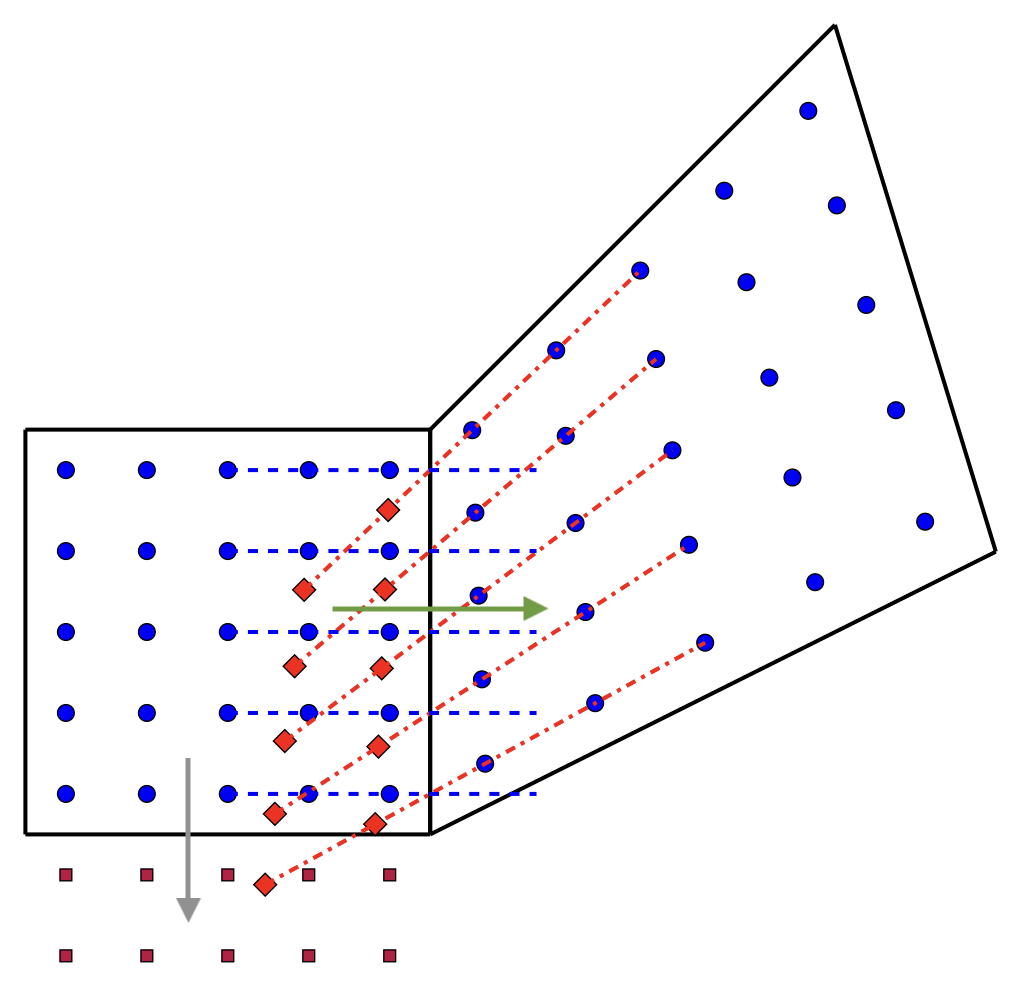
Blue circles denote the cell-centered FD points in the two elements whose ghost points are being exchanged, bright red diamonds denote the ghost points needed for reconstruction in the element on the right, and dark red squares denote the cell-centered FD points in a neighboring element not directly participating in the exchange. The dashed blue and dash-dotted red lines show lines of constant logical coordinates in the left and right elements, respectively. Notice that they intersect on the boundary, but do not align.
In this example, three lowest ghost points cannot be directly interpolated from the element on the left. In such a case, we flag the direction (from the perspective of the element on the left, in this example, the direction the green arrow points to) as problematic and the ghost points may be filled either by extrapolation or interpolation. Extrapolation can lead to an unphysical state like negative densities, so interpolation is generally preferred. To enable interpolation, set EnableExtensionDirections to true in SubcellOptions part of the input file. This enables the use of ghost data from the neighboring element in the extension direction (in this example, the direction the grey arrow points to) to fill the ghost points.
- Warning
- This option is only available in the case where we are only using FD scheme for the evolution, i.e. we are using true for AlwaysUseSubcell in the SubcellOptions part of the input file. Currently, the following cases are not supported:
- There are multiple neighbors in a direction
- There are multiple extension directions required for a single problematic direction.
- The extension direction is itself a problematic direction, which can result in a deadlock.
When disabled, this action does nothing.
When enabled, the action:
- Receives subcell ghost data from neighbors for all non-problematic directions.
- For “problematic directions” it extends the element’s volume data using ghost data from another neighbor (in the "extension direction"). This extension ensures that the ghost data can be filled using interpolation.
- Interpolates to the requested ghost points, and then sends the completed ghost data to the original neighbor.
Member Typedef Documentation
◆ inbox_tags
| using evolution::dg::subcell::Actions::ReceiveAndSendDataForReconstruction< Dim, GhostDataMutator, UseNodegroupDgElements >::inbox_tags |
The documentation for this struct was generated from the following file:
- src/Evolution/DgSubcell/Actions/ReconstructionCommunication.hpp